How to Integrate External API in a WordPress Page: 5 Ways To Do It
APIs (Application Programming Interfaces) are like the middlemen of the internet. They allow two different platforms to talk to each other and share data or functionality. Integrating an external API in WordPress can take your site to the next level live weather updates, real-time stock prices, or social media feeds. Sounds cool, right?
But how can you integrate external API into a WordPress page? Don’t worry I’ll walk you through it step-by-step with five beginner-friendly methods.
Let's start then!
What is an API?
An API, or Application Programming Interface, is a set of rules and protocols that allow different software applications to communicate with each other. It's like a bridge between systems, enabling one program to request and receive data or services from another. For example, a weather app on your phone uses an API to get weather data from a remote server.
APIs simplify development by allowing developers to use predefined functions instead of building features from scratch. They are essential in modern web and mobile applications, helping services like payment gateways, social media platforms, and data providers work seamlessly together.
What Is a Third-Party API
It's an interface provided by an external service or organization that allows developers to access and use its data or functionalities within their own applications. Unlike internal APIs, which are developed and used within a single company, third-party APIs come from outside sources often companies like Google, Facebook, or Stripe. For instance, if you integrate Google Maps into your website, you use a third-party API to display maps, location data, or directions.
These APIs save development time, reduce costs, and add powerful features without building everything from scratch. However, since external providers manage them, you must comply with their terms, limits, and updates. They are widely used for payment processing, social logins, shipping tracking, email automation, and more. Using third-party APIs improves functionality, boosts user experience, and helps developers focus on building core features rather than reinventing existing solutions.
How Third-Party APIs Work
Third-party APIs allow your application to send requests to another system and receive data or perform actions in return. When you integrate a third-party API, you're essentially connecting your app or website to an external service. This connection is made through specific endpoints URLs provided by the API where you can send HTTP requests, usually in formats like GET, POST, PUT or DELETE. Along with the request, you may need to include parameters, headers, and an API key for authentication.
It processes the request and sends a response, typically in JSON or XML format. Your application then uses this data to display content or trigger actions. For example, if you use a weather API, your app sends a location to the API, and the API returns weather details for that area. This system allows developers to quickly and easily add features powered by robust external services.
Why Use External APIs in WordPress?
External APIs offer immense value when integrated into WordPress websites. By connecting your site to external services and data sources, APIs allow you to improve functionality without building everything yourself. Whether running a blog, a business site, or an eCommerce platform, external APIs provide key benefits that make your site more powerful, efficient, and user-friendly. Over 90% of developers use external APIs.
Another reason to use external APIs is time and cost efficiency. Instead of developing custom solutions for every feature or service you want to provide whether it's maps, weather, payments, or social media integration APIs allow you to tap into ready-made solutions. For example, integrating payment gateways like PayPal or Stripe can be done through simple API calls, saving you from building complex, secure payment systems from scratch.
External APIs also provide access to live, dynamic data. This is especially useful for displaying up-to-date information like weather reports, stock prices, news feeds, or real-time sports scores. By pulling in data from external APIs, your site can provide fresh and relevant content, engaging users with constantly updated information. For instance, using a news API on a WordPress site can deliver the latest headlines without manually updating content.
Another important advantage is integrating with third-party tools and services. APIs connect your WordPress site to various software systems, such as
- Customer relationship management
- Email marketing tools
- social media networks.
This creates an efficient, improved workflow and helps automate many tasks, like syncing user data or sending newsletters. Integration with services like Mailchimp or HubSpot or through their APIs simplifies marketing automation, making it easier to manage campaigns.
Moreover, using external APIs improves website performance. External services often have robust infrastructure to handle large volumes of data and requests, reducing the burden on your WordPress hosting. This helps maintain your site’s speed and performance, especially as traffic scales.
Lastly, third-party APIs allow for greater customization and improved user experience. By integrating with external platforms, you can seamlessly provide personalized content, integrate user accounts, or connect with mobile apps. This makes your website more engaging and responsive to user needs.
Preparation Before External APIs Integration
Integrating external APIs into your WordPress site can significantly improve its functionality, but before diving in, it’s essential to make sure you’re adequately prepared. Proper planning, research and testing ensure a smooth integration process, help avoid security vulnerabilities, and guarantee a positive user experience. Here’s a comprehensive guide to help you prepare before integrating external APIs into your WordPress site.
Purpose of the API
Before integrating any API, you should clearly understand what the API will do for your WordPress site. APIs can offer various services, from pulling in real-time data (like weather updates or news feeds) to providing third-party functionalities (like payment processing or email automation).
Start by determining what you want to achieve with the API. Are you looking to add a feature, connect to a third-party service, or automate processes? Knowing this will help you choose the right API and determine the scope of integration. For example, if you want to display live stock market data, you’ll need an API that provides real-time financial information. This initial understanding will guide you in selecting the correct API service for your needs.
Choose the Right API
Not all APIs are created equal, so picking one that fits your needs is important. Consider the following:
Check the provider's track record. You want an API that’s consistently available and has a low downtime. Look for services that offer Service Level Agreements (SLAs) guaranteeing performance.
A well-documented API plugin makes the integration process easier. Look for APIs that provide detailed documentation, including setup instructions, sample code, and usage limits.
Most APIs have rate limits that restrict the number of requests you can make within a certain time frame. Be sure to check these limits, as exceeding them could affect your site's performance. Consider choosing an API with a rate limit that aligns with your expected traffic.
APIs need strong security measures. Ensure that the API uses secure communication protocols (like HTTPS) and offers authentication methods such as API keys or OAuth.
Data Handling and Storage
Consider how the API will interact with your website’s data. Will it require storing the API data in your WordPress database, or will it be fetched in real time and displayed directly? Understanding this can help you determine the most efficient API integration.
If the API sends large amounts of data, you might need to cache the data locally to avoid overloading your server or causing slow page load times. Alternatively, if you’re integrating an API like Google Maps, which requires real-time data, make sure your site is optimized for performance to handle those requests without causing delays.
If you're dealing with user data, also make sure compliance with privacy regulations such as GDPR. Some APIs may store or process sensitive information, and you should always ensure your integration follows best data privacy and security practices.
Create a Backup Plan
Before making any changes to your WordPress site, especially when integrating external APIs, create a backup of your site. So if something goes wrong during the software development, you can easily back your site to its previous state.
Backing up both the database and files (themes, plugins, etc.) will give you peace of mind and prevent the risk of losing any important data. Consider using reliable backup plugins like UpdraftPlus, VaultPress, or BackupBuddy, which can automate this process.
Test the API Integration on a Staging Site
Before integrating the API on your live website, set up a staging environment to test the integration. A demo site is a clone of your live site where you can make changes and test new features.
Pricing and Limits
Many external APIs offer tiered pricing based on usage, and it’s essential to understand the costs associated with each API before integrating it into your WordPress site. Review the pricing structure to ensure that it fits within your budget. Consider the following:
Free vs. Paid Plans
Some APIs offer free plans with limited functionality or usage, while others have paid tiers based on the volume of requests or premium features. Choose the plan that best aligns with your expected usage.
Hidden Fees
Check for any additional fees beyond the introductory pricing, such as overage charges or fees for premium features.
Ongoing Maintenance
API integrations require ongoing maintenance to ensure they continue working correctly. APIS can undergo updates, and their endpoints or functionality may change, which might cause compatibility issues with your site. Regularly maintain for updates from the API provider and test their impact on your site.
Additionally, monitor the API’s performance and usage over time. If you experience issues like slow load times, rate limit errors, or service outages, you’ll need to address them promptly.
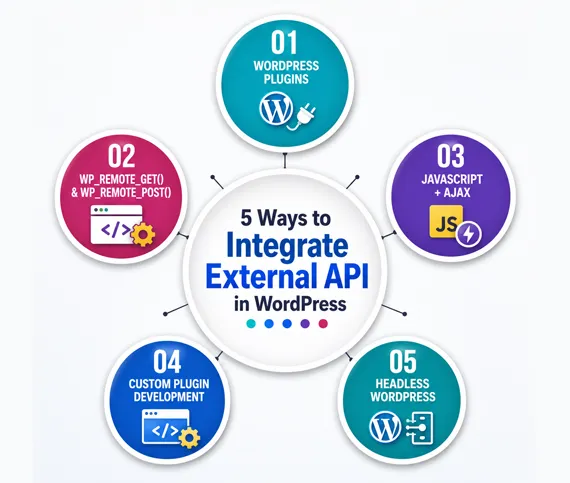
5 Ways to Integrate External API in WordPress
External APIs are a fantastic way to add dynamic content, boost functionality, and connect third-party services directly to your WordPress site. Whether you're displaying real-time weather, pulling product data from an eCommerce platform, or integrating a payment gateway there are several approaches you can take depending on your technical expertise and needs.
Use WordPress Plugins (The Easy Way)
If you're not comfortable writing code, plugins are the simplest and fastest method to integrate external APIs. Many plugins are built specifically for third-party API integration, with user-friendly settings for API keys and customisations.
How it works:
- Install a plugin (e.g., Mailchimp for email, Stripe for payments, or Weather Atlas for weather APIs).
- Enter your API key.
- Customise settings from the WordPress dashboard.
Pros:
- No coding needed.
- Quick setup and deployment.
- Easy to update and maintain.
Cons:
- Limited control or customisation.
- Features you don’t need (bloat).
- Slower if the plugin isn’t optimised.
This method is best for beginners or website owners who want functionality without diving into the technical stuff.
Use wp_remote_get() and wp_remote_post() in functions.php
For developers and more technical users, WordPress offers native functions to make HTTP requests: `wp_remote_get()` and `wp_remote_post()`. These let you fetch data from external APIs and process the results within your WordPress site.
How it works
You add a custom function to your `functions.php` file that makes an API call and outputs the data.
Pros:
- Full control over how and where the data is displayed.
- Lightweight and doesn’t require external plugins.
- Ideal for custom implementations.
Cons:
- Requires basic PHP knowledge.
- You handle error checking and formatting yourself.
- Can be time-consuming for large-scale integrations.
Use this when you want a flexible, custom solution and have some coding experience.
Create a Custom Plugin
If you plan to reuse the API integration or prefer to keep your codebase clean, building a custom plugin is a smart move. It separates your logic from the theme, so updates don’t interfere with functionality.
How it works:
- Create a plugin folder in `wp-content/plugins`.
- Add a PHP file (e.g., `my-api-plugin.php`).
- Write your API logic there and register shortcodes or widgets.
This is great for custom dashboards, calculators, or displaying API-based data in a modular way.
Pros:
- Clean and organized code.
- Easy to move across different sites.
- Doesn’t break if you switch themes.
Cons:
- Requires plugin development knowledge.
- Slightly more complex setup.
Ideal for developers building custom or client-specific tools.
Use JavaScript and AJAX for Frontend Integration
Want to make API calls directly from the frontend? JavaScript (especially the Fetch API or jQuery AJAX) allows you to fetch data asynchronously without refreshing the page.
Pros:
- Fast and dynamic user experience.
- Doesn’t rely on PHP.
- Great for live updates or single-page apps.
Cons:
- API key can be exposed if not secured
- Some APIs restrict client-side access (CORS issues)
This method is great for interactive pages, dashboards, or visualisations.
Headless WordPress or External App Frameworks
Advanced developers may prefer decoupling WordPress from the frontend and building it with React, Vue, or Next.js. In this setup, you pull WordPress content via the WP REST API and combine it with third-party APIs.
How it works:
- WordPress acts as the backend only.
- The frontend calls both the WP REST API and external APIs.
- Data is displayed using modern JavaScript frameworks.
Pros:
- Super fast performance.
- Complete frontend freedom.
- Easily combines multiple APIs.
Cons:
- Complex setup and deployment.
- Requires solid JS and API knowledge.
This is best for large, scalable applications or developers working with JAMstack architectures.
Whether you’re a casual blogger or a seasoned developer, there’s a way to integrate external APIs into WordPress that fits your skill level and goals.
- Beginners can stick with plugins.
- Intermediates should explore `wp_remote_get()` or custom plugins.
- Advanced devs can embrace JavaScript or headless WordPress.
Start small, test thoroughly, and make sure your integration adds real value to your users.
Endnote
This is how you can integrate external API into a WordPress page. Third-party APIs are game-changers in software development. They help developers create powerful, feature-rich apps faster and more affordably by tapping into existing services. But they’re not without risk so it’s important to choose wisely, implement securely, and always have a backup plan. In today’s interconnected digital world, knowing how to work with third-party APIs isn’t just helpful it’s essential.




Pay With


